Ridge Wallet Buying Guide: Versions, Use and Alternatives
The Ridge Wallet suits anyone carrying six cards or fewer, and the $95 aluminum one is the version to buy. Checked on Ridge's site, October 2026.

On this page
- Deals from this guide
- The short answer
- How the Ridge Wallet works
- Does the Ridge Wallet block RFID?
- What owners say
- Ridge Wallet versions and materials compared
- The Ridge Wallet for MagSafe
- How to use a Ridge Wallet
- How many cards really fit?
- Putting cards in
- Getting cards out
- Cash strap or money clip?
- Screws, elastic and cleaning
- Loose or lost screws
- Stuck screws
- Swapping the money clip
- Replacing the elastic
- Cleaning
- Parts and prices
- Tracking options: Tracker Card or AirTag holder
- The Ridge Tracker Card
- Ridge's AirTag holders
- Tracker Card vs AirTag: which to get
- Do you need a tracker if Ridge replaces lost wallets?
- Ridge Wallet alternatives compared
- Ekster: the closest alternative
- Dango: smaller and modular
- Trayvax: the budget metal wallet
- Cheap Ridge Wallet dupes
- How to spot a fake Ridge wallet or store
- Warranty, returns and shipping
- How to pay less for a Ridge Wallet
- Ridge Wallet FAQs
Deals from this guide

The Ridge Wallet is a good buy if you carry about six cards or fewer, want something thin enough to forget in your front pocket, and like the idea of a wallet you never have to replace. For most people the $95 aluminum version is the one to get, because every version holds the same cards at the same size and the pricier ones mostly change weight and finish. It is not worth it if you carry receipts, coins or a thick stack of cards, because a metal card holder rewards a small, tidy carry and punishes a big one. We went through Ridge's own product pages, parts pages, maintenance guide, warranty terms and customer review summaries, plus each rival brand's own website, in October 2026, and every price below is what those sites listed on October 19, 2026. If you decide to buy, check our Ridge Wallet discount codes first, because Ridge was running a sale when we looked.
The short answer
- Which version: aluminum at $95 for most people. Titanium if you are hard on your gear, carbon fiber for the least weight, and the MagSafe version if you want your cards on the back of an iPhone.
- Skip it if you carry lots of cash, coins, receipts or a big stack of cards, or want to pull a card out one-handed without thinking. The Ekster Cardholder Pro, which pops cards out with a button, is the closest alternative.
- To find it if you lose it: the Ridge Tracker Card, $45, works with Apple Find My or Google Find Hub. An AirTag holder, $35, suits iPhone users with a spare AirTag.
- If it is lost or stolen anyway: Ridge's Built for Life Warranty replaces it for a processing fee, up to two times.
- To avoid fakes: buy from ridge.com, Ridge's official Amazon listings or an authorized retailer.
How the Ridge Wallet works
A Ridge Wallet is two rigid plates the size of a credit card, held together by an elastic band and 14 small screws, 7 on each side. Your cards sit in a stack between the plates, and the elastic lets the gap grow from one card to about a dozen. Ridge calls this a patented dual-track design. Every standard Ridge Wallet measures 86 x 54 x 6 mm, barely bigger than a credit card.
On the outside you choose between a cash strap, an elastic band that holds folded bills against the wallet, and a money clip. They are swappable, so you are not stuck with your first choice, and the screws and elastic can be replaced too. Ridge also sells AirTag holders and its own Tracker Card for people who lose wallets, compared further down.
Does the Ridge Wallet block RFID?
Yes. Ridge builds RFID blocking plates into every wallet to stop wireless card readers. It is a nice extra, but it should not be the reason you buy one. Modern contactless cards send a one time code for each payment rather than your full card details, which already makes wireless skimming far less useful to a thief. Think of the RFID blocking as a bonus, not a necessity.
What owners say
Ridge publishes an AI written summary of its most recent reviews on each product page, which is a fair snapshot of what thousands of owners report. On October 19, 2026:
- The standard Ridge Wallet had 4.8 out of 5 stars from 52,820 reviews. Owners praised how thin and well made it is. The common complaints were difficulty getting cards out and, for a few people, screws loosening over time.
- The Ridge Wallet for MagSafe had 4.5 out of 5 stars from 980 reviews. Owners liked having the wallet on the back of the phone, but some said the magnetic hold could be stronger without the adhesive strengthening plate that comes in the box. Many said 4 to 6 cards is the comfortable maximum, and some preferred the money clip.
One featured review from a buyer who had owned an aluminum Ridge since 2022 summed up the long term picture: some discoloration, plenty of drops, still working. That matches what you would expect from coated aluminum. It shows wear, but it keeps working.
Put together, the trade-offs are:
- Cards are slower to get out than from a leather wallet. If you pay with a physical card many times a day, it will always be slower than a slot wallet.
- It is comfortable with fewer cards than the box suggests. Ridge says 1 to 12 cards. Owners say 4 to 6 is the sweet spot.
- Cash is an afterthought. The strap or clip on the outside holds a few folded bills, not a payday.
- Screws can work loose. Tightening them with a T5 driver usually fixes it, and a failed part is free under the warranty.
Ridge Wallet versions and materials compared
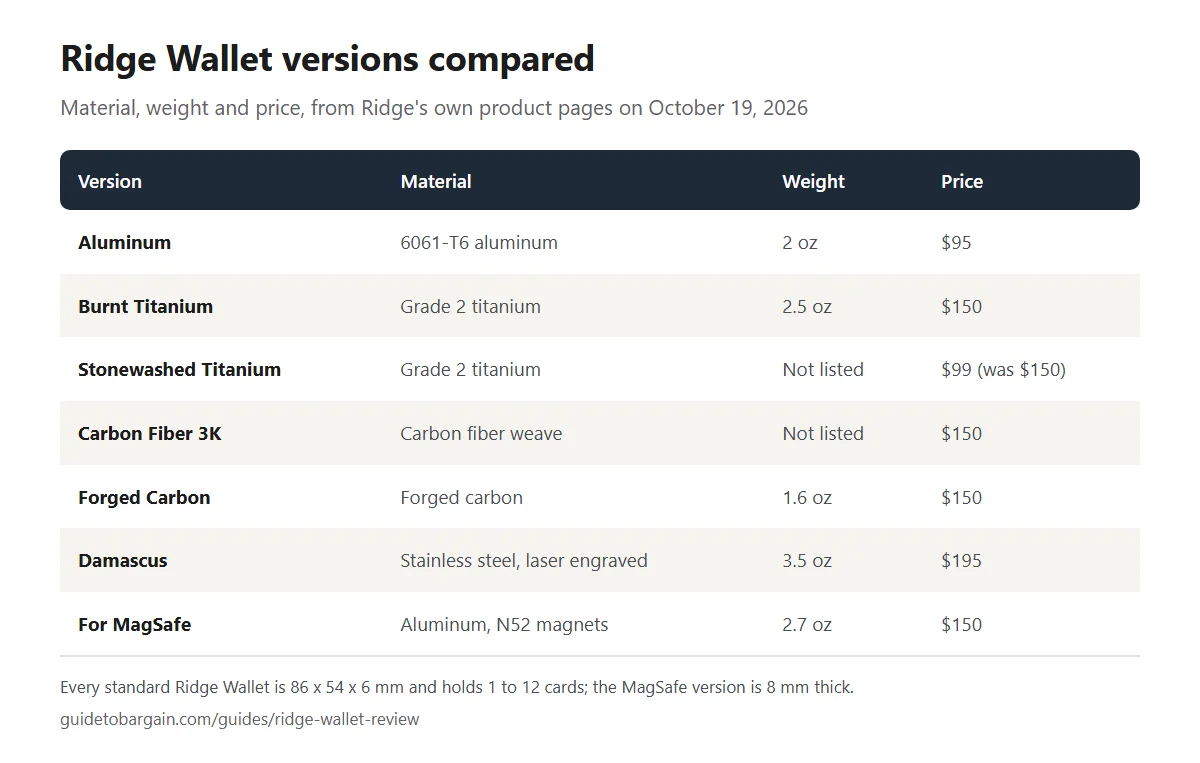
Every version does the same job, holds the same cards and shares the same size. You are paying for weight, finish and how it ages.
- Aluminum ($95): the best value and the one most people should buy. It is 6061-T6 aluminum, weighs 2 ounces and comes in the most colors. Some aluminum colors were marked down to $57 to $76 on October 19, 2026, and one design, NASA Apollo Legacy, was $48.
- Titanium ($150, or $99 for Stonewashed on sale): Grade 2 titanium generally resists wear better than coated aluminum, and Burnt Titanium is slightly heavier at 2.5 ounces. Worth it if you are hard on your gear or like the idea of a wallet that ages slowly.
- Carbon fiber ($150): the light option. Forged Carbon is listed at 1.6 ounces, the lightest version Ridge gives a weight for. Pick it if you want the least weight in your pocket and like the woven or marbled look.
- Damascus ($195): stainless steel with a laser engraved Damascus pattern, not folded Damascus steel, and at 3.5 ounces it is the heaviest. Buy it for the look, not for performance.
If you are torn between aluminum and titanium, buy aluminum. The difference is mostly in how the finish handles years of keys and coins. The warranty replaces a wallet that breaks or is accidentally damaged, but it does not cover scratches or discoloration, so titanium is worth it only if a worn finish would bother you.
A Ridge Wallet can scratch. Ridge lists its finishes as scratch resistant, but coated aluminum picks up marks and some discoloration over years of use. Scratches are cosmetic and do not affect how the wallet works.
The Ridge Wallet for MagSafe
The MagSafe version is the standard wallet with N52 neodymium magnets built in, so it snaps onto the back of an iPhone 13 or newer. It is a little thicker at 86 x 54 x 8 mm and a little heavier at 2.7 ounces in aluminum, and it cost $150 in Matte Black or Gunmetal on October 19, 2026, against $95 for the standard aluminum wallet.
It suits people who already leave the house with just a phone and want their cards attached to it. The magnets hold best on a bare iPhone or a MagSafe case, and Ridge includes an adhesive strengthening plate for a firmer hold. If you use your phone for tap to pay anyway, the standard wallet in a front pocket does the same job for $55 less.
How to use a Ridge Wallet
How many cards really fit?
Ridge says the wallet expands to hold 1 to 12 cards without stretching out, and that is true in the literal sense. The practical answer is smaller. Ridge's own review summaries say owners find about 4 to 6 cards comfortable, and that past that the wallet gets thicker and individual cards get harder to reach.
A simple test before you buy: count the cards you actually used in the last month. If it is six or fewer, a Ridge will feel easy. If you carry loyalty cards, a transit card, two IDs and three credit cards, either trim the stack (most loyalty cards live in phone apps now) or choose a different style of wallet.
Putting cards in
- Stack your cards with the ones you use most at the front or the back of the stack, where they are easiest to reach.
- Slide the stack in from the top, between the two plates. The elastic band inside lets the gap widen to fit your cards.
- Push them all the way down until they sit flush with the plates.
A new Ridge feels tight, and that is by design: the elastic holds your cards firmly so they do not slide out.
Getting cards out
This is the part that takes some getting used to.
- Hold the wallet with the open top facing up.
- Use your thumb to press on the cards through the half-moon cut-out at the bottom of the wallet, so they slide up out of the top.
- Fan the cards slightly so you can see their edges. A tip owners share: gently pinch a bottom corner of the wallet to spread them, but not too hard, or the cards can shoot out.
- Pull out the card you need, then push the rest back down.
If you use one card far more than the others, keep it at the front or back of the stack, or slide it partly out of the top so it is the first one you grab. It gets quicker with practice.

Cash strap or money clip?
Both carry cash on the outside of the wallet.
- Cash strap: the default. Fold your bills and slide them under the elastic strap on the back. It keeps a few bills flat, which suits people who carry cash for tips or parking.
- Money clip: fold your bills and slide them under the clip. It holds more cash and makes bills quicker to grab.
Ridge sells both as swappable kits, so start with whichever came in the box and switch if it annoys you.
Screws, elastic and cleaning
Almost every fix is a five minute job with a T5 Torx driver, which Ridge sells on its own for $7. The steps below come from Ridge's own maintenance guide.
Loose or lost screws
- Loose screws: tighten them gently. Do not overdo it: Ridge's guide warns that overtightening can strip the screw head or put too much pressure on the plates. For screws that keep backing out, Ridge's guide suggests a thread-locking product made for small screws.
- Lost screws: Ridge's Screw Set, $15, includes 14 stainless steel Torx screws, a T5 driver, a main wallet elastic and a cash strap elastic. It also comes in colors such as black, silver, blue and gold if you want to change the look. If a screw fell out because of a defect, a replacement should be free under the warranty.
Stuck screws
- Use the correct T5 Torx driver so it fits the screw head properly.
- Apply a penetrating oil, such as WD-40 Rust Release Penetrant, and let it sit for a few minutes.
- Tap the screw head gently to help break the bond.
- Turn counterclockwise with steady pressure, without forcing it.
- If the head is stripped, use a small screw extractor, then fit new screws.
Swapping the money clip
- Remove the 4 screws closest to the money clip with the T5 Torx driver.
- Pull the old clip out. It should slide out easily.
- Slide in the new clip until it is flush and even on both sides.
- Put the 4 screws back in.
Replacing the elastic
If the main elastic gets cut or loses its grip:
- Order a replacement elastic. Ridge's Elastic Set, $15, includes a main wallet elastic, a cash strap elastic, 14 screws and a T5 driver.
- Remove all 14 screws with the T5 Torx driver. This releases the faceplates.
- Take the old elastic off from around the inner plates.
- Fit the new elastic in its place.
- Put the faceplates back and replace the screws.
Cleaning
- Light dirt: scrub with a small soft-bristled brush and a mild detergent.
- Heavier build-up: remove the 7 screws on one side and take off the faceplate, take out the elastic and keep it dry, then soak the plates in warm water with mild detergent and scrub them with a soft brush. A money clip is fine to wash.
- Titanium: Ridge says glass cleaner such as Windex works well.
Parts and prices
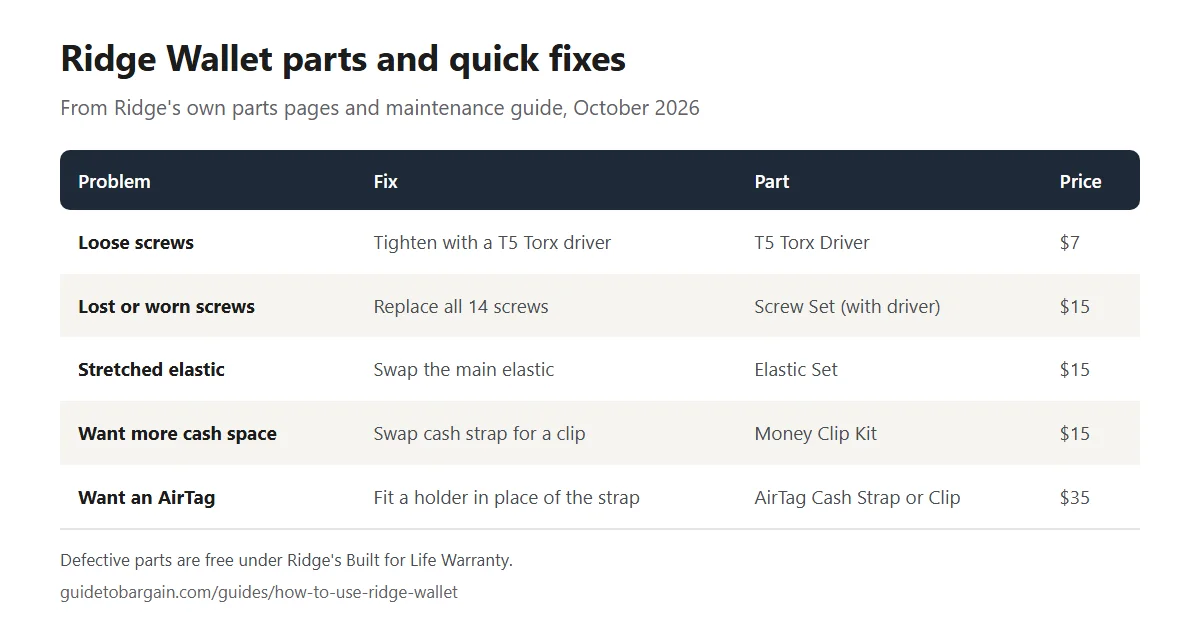
A part that fails is replaced free under the Built for Life Warranty, explained below. If you want spares, an upgrade or a different look without making a claim, the parts are cheap:
| Part | Price on Oct 19, 2026 |
|---|---|
| T5 Torx Driver | $7 |
| Screw Set (14 screws, driver, 2 elastics) | $15 |
| Elastic Set (2 elastics, 14 screws, driver) | $15 |
| Money Clip Kit | $15 |
| Cash Strap Kit | $20, or $30 in carbon fiber |
| AirTag Money Clip or Cash Strap | $35 |
Tracking options: Tracker Card or AirTag holder
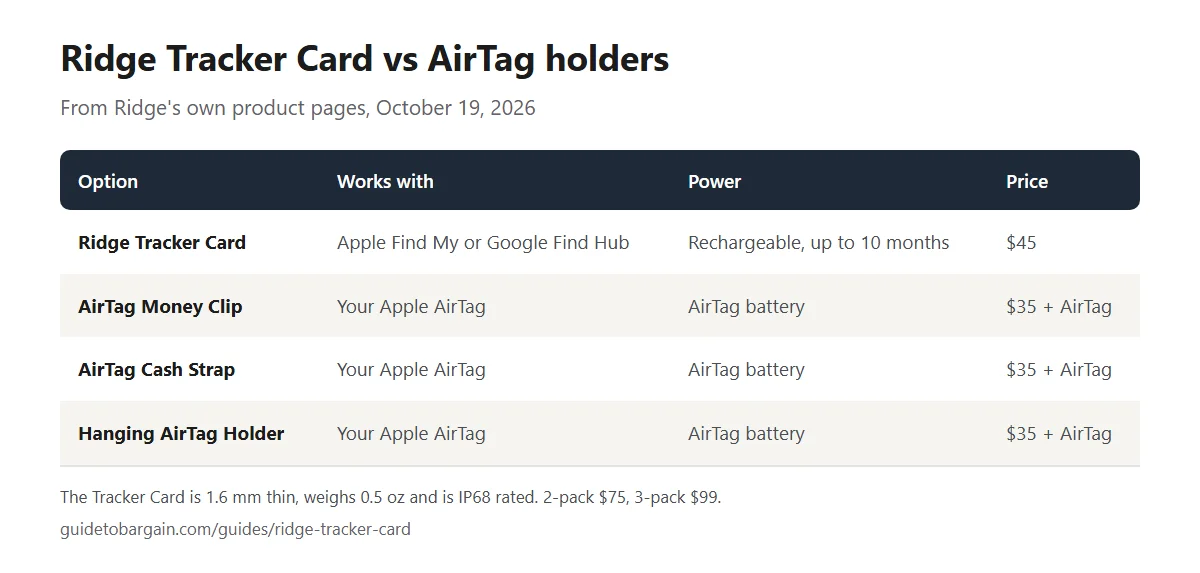
You can track a Ridge Wallet in two ways: Ridge's own Tracker Card, which is the size of a credit card and sits inside the wallet with your cards, or an Apple AirTag held on the outside of the wallet in one of Ridge's AirTag holders. The Tracker Card is the better choice for most people, especially Android users, because it works with Google Find Hub as well as Apple Find My and recharges wirelessly.
The Ridge Tracker Card
The Tracker Card is a Bluetooth tracker shaped like a credit card. According to Ridge's product page, as of October 2026:
- Networks: works with Apple Find My or Google Find Hub, so iPhone and Android users can both use it.
- Size: 3.375 x 2.125 inches, the size of a bank card, and just 0.06 inches (about 1.6 mm) thick.
- Weight: 0.5 ounces.
- Battery: a 155 mAh rechargeable battery that lasts up to 10 months per charge.
- Charging: it charges on any Qi or MagSafe wireless charger, so there are no batteries to replace.
- Ringer: a 95 dB ringer with a range of up to 300 feet (90 meters).
- Durability: IP68 rated against dust and water.
- Extras: alerts if your wallet moves out of range, voice commands through Siri or Google Assistant, and location sharing with up to 5 trusted contacts.
It cost $45 on its own, $75 for a two-pack and $99 for a three-pack on October 19, 2026, and had 4.8 out of 5 stars from 1,206 reviews on Ridge's site.
Because it is the same size as a bank card, it slides into the card stack like any other card. That keeps your wallet's shape and stops a bump showing in your pocket. The trade-off is that it takes up one of your card spaces, so if you already carry 4 to 6 cards, drop one you rarely use.
Ridge's AI written summary of recent Tracker Card reviews, on October 19, 2026, said owners like the slim profile, how easy it was to set up with Apple's Find My app, recharging it instead of replacing batteries, the loud ringer, accurate location, reliable connection and charging it on a regular wireless charger. The same summary said some owners reported connectivity issues and random alarms after using it for a while. Those are the kind of faults the warranty and Ridge's 99-day trial are there for.
Ridge's AirTag holders
If you would rather use an Apple AirTag, Ridge sells several ways to attach one, each $35 on October 19, 2026:
- AirTag Money Clip: a money clip with a built-in AirTag holder. The kit includes 14 replacement T5 Torx screws, a main wallet elastic and a T5 driver.
- AirTag Cash Strap: a cash strap with an AirTag housing plate. The kit includes the housing plate, 14 screws, a strap elastic, a main wallet elastic and a T5 driver.
- Carbon AirTag Money Clip: the money clip version in carbon fiber.
- Hanging AirTag Holder: a hanging-style AirTag holder, sold on its own.
Ridge says the AirTag holders work with first and second generation AirTags. You need to supply the AirTag, which is sold separately by Apple, and you need an Apple device to set it up and track it.
Tracker Card vs AirTag: which to get
| Ridge Tracker Card | AirTag in a Ridge holder | |
|---|---|---|
| Works with | Apple Find My or Google Find Hub | Apple Find My only |
| Where it sits | Inside the card stack | On the outside of the wallet |
| Adds bulk | Barely, about 1.6 mm | Yes, the AirTag sits on the outside |
| Power | Rechargeable, up to 10 months per charge | AirTag's own battery |
| Price on Oct 19, 2026 | $45 | $35 holder plus an AirTag |
Choose the Tracker Card if you use Android, want the slimmest wallet, or do not already own a spare AirTag.
Choose an AirTag holder if you already have an AirTag, use an iPhone, and do not mind a little extra bulk on the outside of the wallet.
Do you need a tracker if Ridge replaces lost wallets?
They solve different problems. Ridge's warranty replaces a lost or stolen wallet for a fee, but that gets you a new wallet, not your cards, ID and cash. A tracker helps you find the wallet with everything still in it, which is usually what you actually want. For most people, the tracker is the first line of defense and the warranty is the backup.
Ridge Wallet alternatives compared
Depending on what annoys you about the Ridge, another wallet may suit you better. We compared each one using its maker's own website on October 19, 2026.
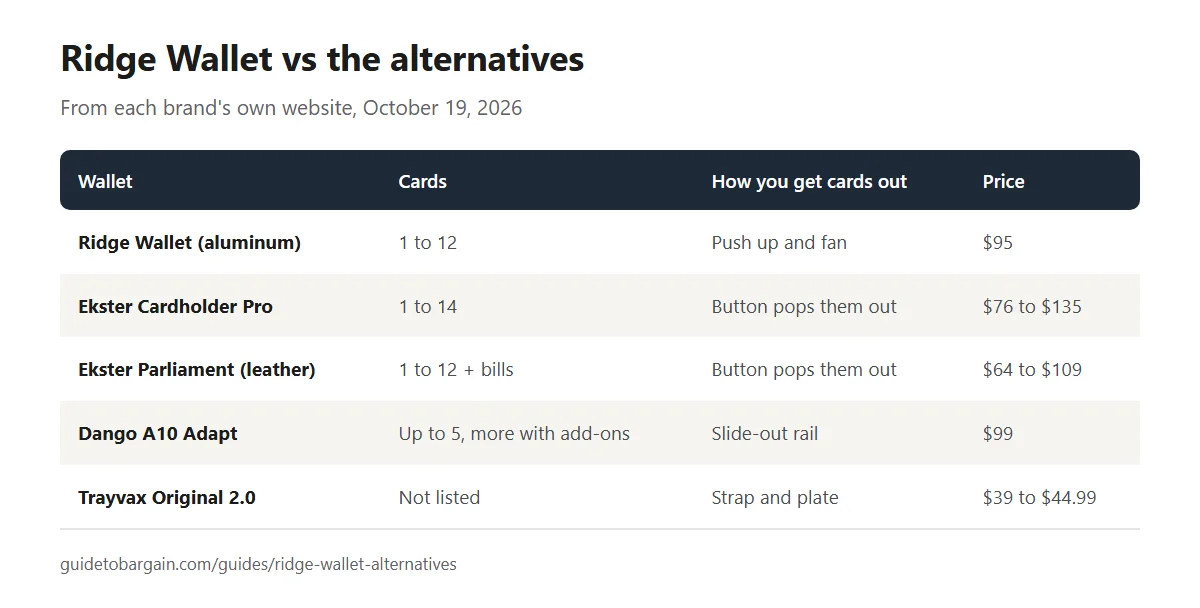
| Wallet | Cards | How cards come out | Price on Oct 19, 2026 |
|---|---|---|---|
| Ridge Wallet (aluminum) | 1 to 12 | Push up from the bottom and fan | $95 |
| Ekster Cardholder Pro | 1 to 14 | A button pops them out | $76 to $135 |
| Ekster Parliament (leather) | 1 to 12, plus bills | A button pops them out | $64 to $109 |
| Dango A10 Adapt | Up to 5, more with add-ons | Slide-out rail | $99 |
| Trayvax Original 2.0 | Not listed | Strap and plate | $39 to $44.99 |
Ekster: the closest alternative
Ekster is the brand most often compared with Ridge, and the key difference is getting cards out. Ridge asks you to push the stack up with your thumb and fan it. Ekster wallets have a button instead, which Ekster describes as quick card access at the click of a button.
- Ekster Cardholder Pro: holds 1 to 14 cards and bills, built from 100% recycled 6061 aluminum, with an all-metal button mechanism, RFID blocking, an expandable backplate and a lifetime warranty. It cost $76 to $135 depending on the version.
- Ekster Parliament: a leather wallet that holds 1 to 12 cards and bills, with the same click-button card access and RFID blocking, at $64 to $109.
- Ekster Cardholder Nano for MagSafe: Ekster's smallest MagSafe card holder, at $69, against $150 for the Ridge Wallet for MagSafe.
Choose Ekster if you take cards out many times a day and Ridge's thumb push sounds annoying. Choose Ridge if you want a simpler design with fewer moving parts and the Built for Life Warranty, which covers loss and theft as well as defects.
Dango: smaller and modular
Dango makes rugged, modular wallets. Its A10 Adapt, $99 for the single pocket version, is machined from 6061 aluminum and weighs 2.3 ounces. On its own it holds up to 5 cards: 4 behind a removable RFID plate and 1 in a window on the front for an ID or transit card you tap often. Add-on pockets slide onto its rail system without tools if you need more space.
Choose Dango if you carry only a few cards and like the idea of a front ID window, or you want a wallet you can expand later.
Trayvax: the budget metal wallet
Trayvax describes several of its wallets as made in the USA on its product pages. Its flagship Original 2.0 started at $39 for special editions on October 19, 2026, less than half the price of a Ridge. Trayvax also sells a CNC-machined MagSafe wallet, the Traverse, from $104.99.
Choose Trayvax if you want a metal wallet on a budget, or you like the idea of buying American made.
Cheap Ridge Wallet dupes
Search marketplaces like Amazon, Temu or AliExpress and you will find Ridge lookalikes for a fraction of the price. Some are fine for the money. But be clear about what you give up:
- No Ridge warranty. Ridge's Built for Life Warranty, which covers loss, theft and damage, only applies to wallets bought from Ridge's own websites, Ridge's official Amazon listings and authorized Ridge retailers.
- Unknown materials. Ridge lists 6061-T6 aluminum, Grade 2 titanium or carbon fiber. A dupe's listing may say "aluminum" without saying which grade, or how it is finished.
- Unknown RFID blocking. Any wallet can claim to block RFID. Without testing, you cannot know.
- Parts. Ridge sells replacement screws, elastic and cash straps for its wallets. A dupe's elastic may not be replaceable at all.
A dupe can make sense if you just want to try the card holder style before spending $95. If you like it, the real thing is worth the upgrade.
How to spot a fake Ridge wallet or store

This matters more than dupes, because a fake can cost you full price and come with no warranty at all.
- Start from ridge.com. Ridge's official US store is ridge.com, and it has a country selector for other regions. Use that instead of clicking a lookalike link in an ad.
- Be suspicious of huge discounts. Ridge's aluminum wallet was $95 on October 19, 2026, and its sitewide sale that day was up to 40% off. A "Ridge Wallet" for $19.99 or a "going out of business, 80% off" ad is a classic sign of a fake store.
- Check the web address carefully. Fake stores often copy Ridge's look but use a different domain with extra words or unusual endings. If you did not get there from ridge.com, look again.
- On Amazon, check the seller. Ridge sells through official Amazon listings. If the seller is an unfamiliar name, the wallet may not be covered by Ridge's warranty.
- Look at the payment options and contact details. A real store has a clear return policy and contact information. Ridge's policy offers a 99-day return window with a prepaid label for US orders.
If you think you bought a fake, contact your card issuer quickly. Card companies can often dispute charges for goods that were misrepresented or never arrived.
Warranty, returns and shipping
This is where Ridge genuinely stands out, but the fine print matters.
| What happens | What Ridge does, as of October 31, 2026 |
|---|---|
| A part is defective | Free replacement parts, such as screws and elastic |
| The wallet is lost, stolen or accidentally damaged | Full replacement for a processing fee |
| Fee, wallets under $150 | $17.95 |
| Fee, wallets $150 and up | $27.95 |
| Limit | Up to two full replacements |
| Scratches, dents or discoloration | Not covered: Ridge treats them as cosmetic |
The Built for Life Warranty covers Ridge Wallets, KeyCases, pens, phone cases and curb chains bought from Ridge's own sites, its official Amazon listings or authorized retailers on or after October 14, 2025. It covers defects, loss, theft, damage from normal wear and tear, and accidental damage. It does not cover cosmetic marks that don't affect how the wallet works, wallets bought before October 14, 2025, or wallets from unauthorized sellers such as eBay and Facebook Marketplace. If your original style is no longer sold, Ridge sends a comparable one. Claims go through Ridge's online warranty portal, and the full terms are in Ridge's warranty policy.
That changes the math on the price. At $95, the aluminum Ridge costs more than a basic card holder, because you are paying for machined metal, replaceable parts and this warranty. It should outlast several cheaper wallets, and a lost leather wallet is a full repurchase while a lost aluminum Ridge is a $17.95 processing fee.
The 99-day trial is the other safety net. Ridge's refund policy says you can return an order within 99 days of purchase for a refund to your original payment method or an exchange, with a prepaid USPS label. The same policy asks for returns to be unused and in the condition you received them, so if you are unsure, test the fit with your cards for a day and keep the packaging.
Shipping was free on most US orders over $35 when we checked, with delivery in 2 to 7 days.
How to pay less for a Ridge Wallet
- Start with aluminum. It is the cheapest standard version and does everything the expensive ones do.
- Check the colors on sale. On October 19, 2026, several aluminum colors were $57 to $76 instead of $95.
- Look for an event. Ridge was running a Friends and Family sale of up to 40% off when we checked, so if no sale is on, waiting a few weeks can pay. Our Black Friday shopping plan covers how to time bigger purchases.
- Use a code. Our current Ridge coupon codes page lists the offers we have checked.
- Buy trackers in packs. The Tracker Card two-pack works out to $37.50 each and the three-pack to $33 each, so share with family or put one in a bag.
- Bundle only what you will use. Ridge's kits add a KeyCase or a power bank. They are good value if you want those items, not if you are buying them because the bundle looks cheaper.
Ridge also makes rings with a similar replacement promise, covered in our Ridge rings guide, and our guides to the Ridge Power Bank and Ridge luggage cover the rest of the range.
Ridge Wallet FAQs
Is the Ridge Wallet worth it?
Yes, if you carry a small number of cards and want a slim, durable wallet. The aluminum version cost $95 on October 19, 2026, had 4.8 out of 5 stars from 52,820 reviews on Ridge's site, and comes with a warranty that replaces it for a processing fee if it is lost or stolen. Titanium, carbon fiber and Damascus versions cost $150 to $195 and mainly change weight and finish.
How many cards does a Ridge Wallet hold?
Ridge says 1 to 12 cards. In practice, owners say about 4 to 6 cards is the comfortable range, and beyond that the wallet gets thicker and cards get harder to fan out.
How do you get cards out of a Ridge Wallet?
Push the stack of cards up through the cut-out at the bottom of the wallet with your thumb, fan them slightly, and pull out the card you need. Keeping your most used card at the front or back of the stack makes it quicker.
What screwdriver does a Ridge Wallet use?
A T5 Torx driver. Ridge sells one for $7, and it is included in Ridge's Screw Set, Elastic Set and AirTag kits. The wallet has 14 screws in total, 7 on each side.
What are the dimensions of the Ridge Wallet?
The standard Ridge Wallet measures 86 x 54 x 6 mm. The aluminum version weighs 2 ounces. The Ridge Wallet for MagSafe is 86 x 54 x 8 mm and weighs 2.7 ounces.
Can you put an AirTag in a Ridge Wallet?
Yes, using one of Ridge's AirTag holders, such as the AirTag Money Clip or AirTag Cash Strap, which cost $35 each on October 19, 2026 and work with first and second generation AirTags, sold separately. The Ridge Tracker Card, $45, is the alternative: it sits inside the card stack, recharges wirelessly and also works with Android through Google Find Hub.
What is the best Ridge Wallet alternative?
For most people, the Ekster Cardholder Pro, because its button pops your cards out, which is the main thing Ridge owners wish was easier. It holds 1 to 14 cards and cost $76 to $135 on October 19, 2026. Ridge is simpler, with no moving parts, and its warranty covers loss and theft.
How can I tell if a Ridge Wallet is fake?
Buy from ridge.com, which is Ridge's official US website, Ridge's official Amazon listings or an authorized retailer, and be wary of huge discounts. A Ridge Wallet far below Ridge's own sale price, or a "going out of business" sale, is a strong sign of a fake store. Ridge was selling normally on ridge.com on October 19, 2026.
Some links in this guide are affiliate links: we may earn a commission if you buy, at no extra cost to you. Affiliate disclosure.